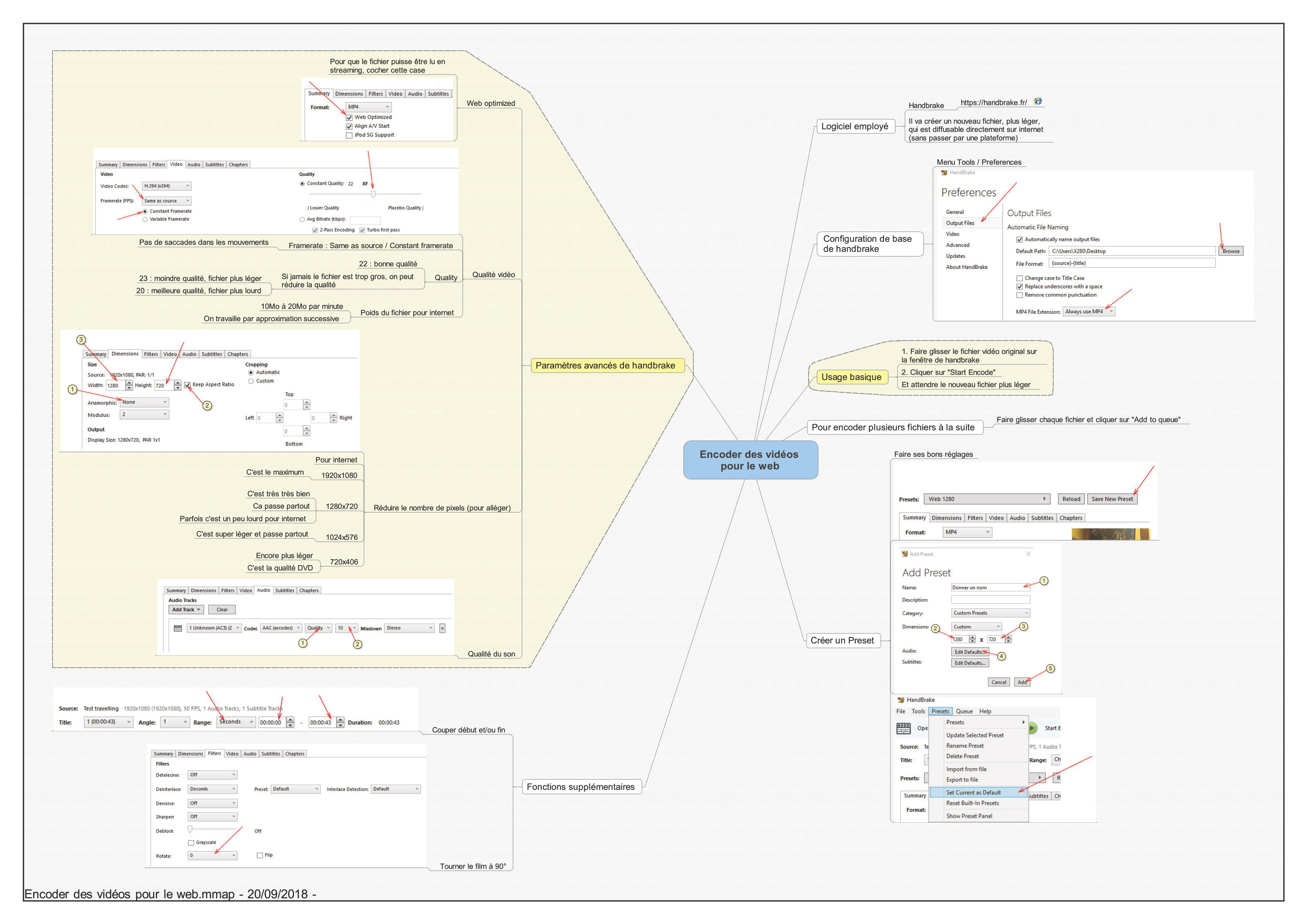
Reduce the size of a video file while maintaining the best possible quality. Guide for Handbrake free software.
Broadcasting video, whether on your computer, telephone, television, on the web, in a theatre or cinema, is the most common and commonplace thing today. However, as a spectator, we are often confronted, as spectators, with pixelated, jerky, distorted images... or our files are too heavy, not readable...
Of course, we are looking for the best possible quality for the broadcast of our video. So we usually prefer larger video files, which are supposed to be of better quality. But often they are then difficult to read for our interlocutors, sending them on the Internet can take a long time, etc.
From my professional experience, here is the sharing of a very concrete and easy to use technique to make your video files:
- Lighter for sending via the web.
- Of the same or almost the same quality as the original.
- Readable everywhere without difficulty.
The issue may seem purely technical, but in reality it is much more general, because it is the quality of the reception by the spectators in question, the quality of their experience. What is also at stake is the fluidity of professional practice: video files that work right away, that are of good quality and do not take hours to send, that can be tested before they are broadcast, this greatly simplifies the work.
Concept
It is necessary to distinguish, in video, two levels of quality of video files:
- The master file : your original, of the best possible quality, to be saved as the apple of your eye. The file is perfect, but it is very large and difficult to use as such for distribution.
- The distribution files : the files that we will transmit. Each one will be “encoded” so that it can be adapted to its distribution channel: DVD, Blu-ray, DCP for cinema, web, etc.
- (there is also an intermediate level, the pivot files, which is the format requested by your broadcaster)
Methodology
Here are the steps to create a distribution file for the projection and/or for the web. I am not proposing explanations here, but just concrete actions, only practice. ThisPDF document summarizes the steps on a single page.
First of all, you must make your master file with your editing software. Each software has its own specificities, make sure you produce the best possible quality. And check it out by looking at it. Keep two copies of this file on two different media, it is your most valuable asset.
You can then close your editing software, you will no longer need it. No assembly software is able to export lightweight and of good quality.
You will use the free and open source Handbrake software (https://handbrake.fr/), which runs on Windows, Mac and Linux. It is free but it is the highest quality software you can find. And it is very easy to use, if you have the right method.
Here is the use of Handbrake step by step, illustrated by images. A picture is worth a thousand words, I invite you to print thePDF document to do it concretely:
- Basic use of Handbrake:

- Quality control:

- Creating presets (stored settings) :

- Additional functions:


And here is the full document:

Advices
If you have experienced the software with my instructions, you have learned many things, I will not go into more technical details here. But here are three more tips:
- For web streaming (I refer you tothis article for online tips), take care, as indicated, that the file does not weigh more than 20MB / minute.
- For a theatrical release, I suggest you set the quality level to 20, and, even if it may seem strange, a definition of 1280x720 pixels already makes it possible to make a very good projection. Of course the ideal is 1920x1080 pixels, but it is not mandatory. This allows, eventually, to kill two birds with one stone: the same file for the internet and for the projection.
- Your quality criteria are your eyes and ears: look carefully at your film after encoding with Handbrake, check for yourself if the quality suits you, and make any changes. Technology is only a tool for an experience, put experience first.
For Mac users
For Mac users, this preset allows you to get a very good quality directly, without trying to understand anything: 
About Handbrake
I won’t go into the technical details, but Handbrake, although it’s free software, uses the most qualitative approach I know to video encoding (through the proper management of the quality constant, which is extremely rare). To put it quickly, it is in my opinion and very seriously the best MP4 encoder there is, in terms of file size / technical quality ratio. And it is very easy to use!
It is a software open source (i.e. everyone can contribute to its development), developed since 2003 and very regularly updated.


