Has this ever happened to you? The edit is finished, you need to make a file, and the software offers several formats without you knowing which one to pick. In a camera, and even in a simple phone, there are also settings to choose, 4K, Full HD, 2K, and we usually take whichever one looks like the best. Here I give the main definitions we come across today. I am simplifying a little, there are many others, but I would like to give some elements for understanding, and for choosing your definition starting from the place where the film will be seen.
From the phone to the projector
When I shoot with my phone or my camera, I get a video file. When I edit, I put several of these files together, and at the end I export another one. When I screen the film, on a website, in a cinema or in an exhibition, it is once again a file that is played. So the video file runs through the whole process. Even with CapCut, a very simple editing application for phones, you have to pay attention to its settings: the application sets the project to match the first video you import, at least in the version I use, and the following videos are adapted to that one without you knowing.
The definition is the number of pixels the image is made of, in width and in height, 1920 × 1080 for example. Almost all software says “resolution”, but strictly speaking it is not the right word. Resolution is a density, a number of pixels per centimetre or per inch. An image of 1920 × 1080 pixels has a very fine resolution on a phone and a very coarse one on a ten-metre wall, and yet it is the same image, with the same definition.
The main definitions
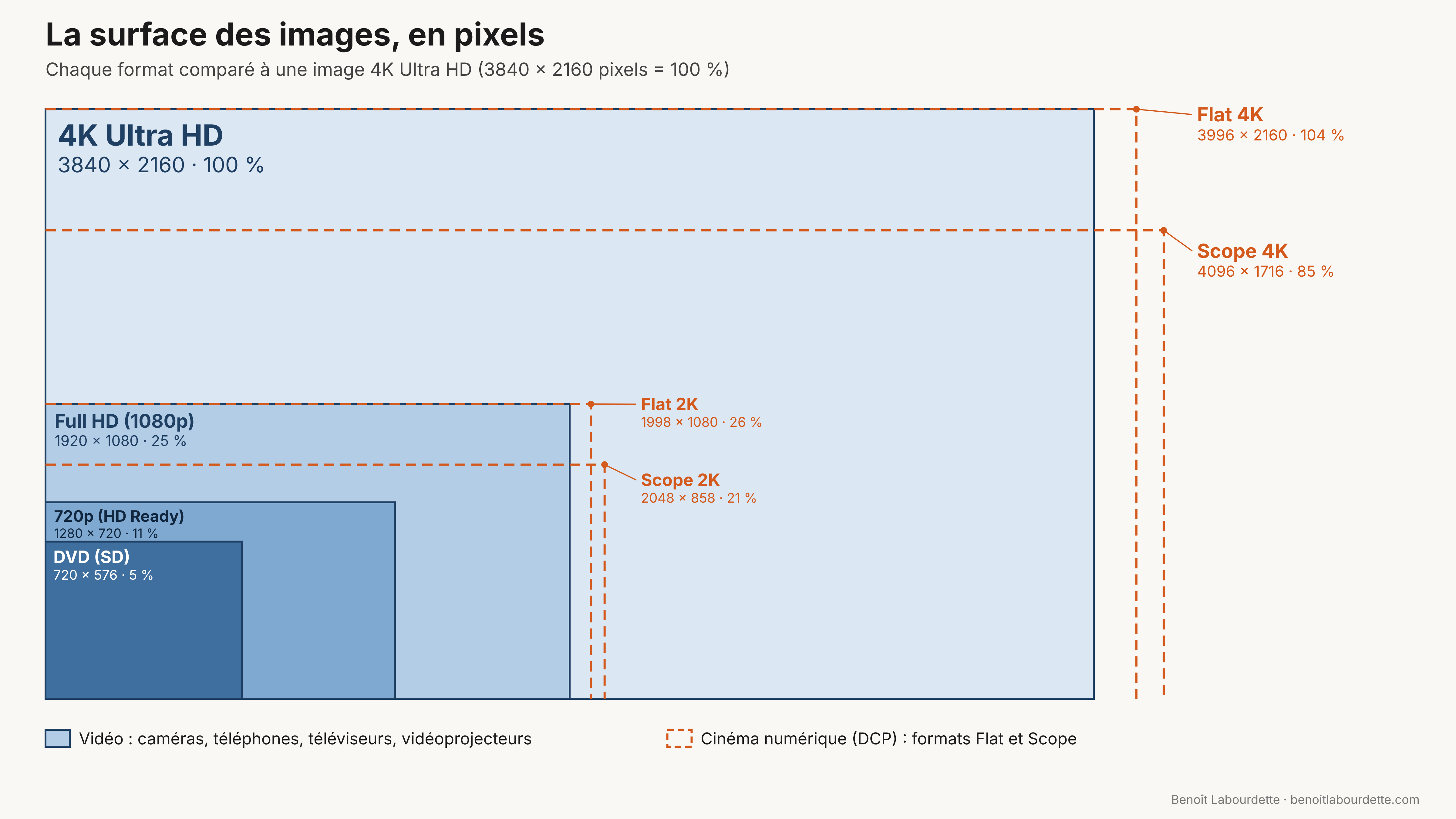
There are a great many definitions, which is what makes the choice complicated, and sometimes there is no choice at all. Here are the ones we come across most often in video. So that the surfaces can be compared, I give for each one the share it represents compared with a 4K image:
- SD, the DVD definition: 720 × 576 pixels in Europe (720 × 480 in the United States and Japan), or 5% of the surface of a 4K image;
- 720p, or HD Ready: 1280 × 720 pixels, or 11%;
- Full HD, or 1080p: 1920 × 1080 pixels, or 25%;
- Ultra HD, which we call 4K: 3840 × 2160 pixels, 100%.
I am surprised, in my exchanges with students, to see that the DVD is still around. Its definition is called SD, for Standard Definition. The difference between Europe and the United States comes from the history of television, which I told in Chapter 3 : Technology of television. The DVD is a medium and SD is a definition: you cannot put more pixels on a DVD, but you can perfectly well make an SD file without a DVD.
The Blu-ray, released in 2006, carries HD, High Definition, in its most common version, Full HD. If you do the maths, a Full HD image contains a little over two million pixels, and an SD image a little over four hundred thousand, five times fewer. That is why a DVD watched on a large television looks blurry today.
In between, there is 1280 × 720, also called “720p” or, on televisions from the second half of the 2000s, “HD Ready”. The quality is already very good, and the files are much lighter than Full HD, so easier to distribute and to keep. I encode the workshop films I put online in 720p.
Full HD is also called “1080p”. The “p” stands for progressive: each image is complete, as opposed to the “i” of interlacing, which I explained in Chapter 4 : Interlaced video. Full HD may seem dated, yet it remains the most widespread definition. It is the basic definition of cameras and phones, and most of the projectors and screens I come across in museums, libraries or multipurpose halls are 1920 × 1080.
With Ultra HD, the width and height of Full HD are multiplied by two, and the surface of the image becomes four times larger. There is also 8K, 7680 × 4320 pixels: you double again, and reach sixteen times Full HD. A few phones can already shoot in 8K.
Flat and Scope
In a cinema, you do not project an MP4 file. You project a DCP, for Digital Cinema Package, which brings together the image, the sound and the subtitles. I explained how to make one with the DCP-o-matic software in Create a DCP for theatrical screening. A DCP is either 2K or 4K, and cinema 4K measures 4096 × 2160 pixels, slightly wider than television 4K. But the projected image only has two formats:
- Flat: 1998 × 1080 pixels in 2K, 3996 × 2160 in 4K, that is 1.85 wide for 1 high;
- Scope: 2048 × 858 pixels in 2K, 4096 × 1716 in 4K, that is 2.39 wide for 1 high; people still often say 2.35, the ratio of the CinemaScope of the 1950s.
Both formats are wider than the 16:9 of our televisions, which is 1.78 wide for 1 high. When you watch a cinema film on a 16:9 screen, there are therefore black bars at the top and bottom. For a Flat film they are thin, about twenty pixels at the top and at the bottom on a Full HD screen. For a Scope film they are wide, nearly 140 pixels at the top and as many at the bottom, and the image only fills three quarters of the height of the screen. These bars make it possible to see the film in its proportions, without distorting or cropping it.
The problem also arises the other way round. When I make a DCP from a film edited in 16:9, I place it in the Flat format, and the software adds thin vertical black bars, 39 pixels on each side.
Pixels are not the whole of quality
When I ask whether DVDs are of good quality, many people say yes. They are very surprised to learn that the image of a DVD, a standard that dates from 1997, is only 720 × 576 pixels, because we have the idea that a good image necessarily has a lot of pixels. I ask the question precisely to take this idea apart. Have you ever seen, on a DVD or on the internet, the image suddenly break up into big squares, then return to normal? This defect comes from the encoding, the way the file was compressed. I made a great many DVDs: their definition is fixed, and all the work on image quality went through encoding.
It is also encoding that allows a film to be watched over the internet. I recently projected, on a 4K screen, a collective film shot with a camera in Full HD. I had encoded it in 1280 × 720 so that it could be played over the internet, and it was played directly online, through my phone’s connection sharing. I clicked, and the film started straight away, without stuttering. This is what video platforms do with the files we entrust to them: they encode them so that they are compatible with the way the internet works. It is not really streaming, but what is called progressive download. The file has a sufficiently low bitrate and it contains indexes, so that it can start playing while it is still being downloaded. That is the whole trick, and you can do it yourself. I gave settings in Create lightweight, high-quality video files and in Best practices for putting videos online.
More pixels also means heavier files. On an iPhone, one minute filmed in Full HD at 30 frames per second weighs about 65 MB; the same minute in 4K weighs about 170 MB, and 400 MB at 60 frames per second. If you shoot everything in 4K, the computer struggles during editing, hard drives fill up very quickly, everything becomes complicated to manage, and sometimes you can no longer even keep your rushes. If the film is finally shown in 1280 × 720, you will have gone to all that trouble for nothing. My projector, for example, displays 1080p: even if I give it 4K images, it will only show 1920 × 1080 pixels. Is it worth shooting in 4K for it? Maybe, maybe not.
Some will tell me that by shooting in 4K you can reframe within the image and have much more freedom in editing. That is true, but you can also take care with your shooting, and then you do not need to reframe afterwards. It is a question of rigour in the work. Alfred Hitchcock shot only the shots that were needed, so as to steer the editing that would be done himself. The best is sometimes the enemy of the good.
The distance between the eye and the screen
Someone could say to me, about this collective film: how shameful, you dare to show a 1280 × 720 film on a 4K screen! Whether the image is 1280 or 3840 pixels wide, the difference seems huge. If I stand right next to the screen, of course, I see the pixels. But at the back of the room, you cannot see the difference. Our eye has what is called a resolving power: beyond a certain distance, it can no longer tell two neighbouring points apart. This limit is generally set at one minute of arc, a sixtieth of a degree.
For the opera The Cunning Little Vixen, in 2016, I had to accept a 1280 × 720 projector, because it did not blow and so did not disturb the music. The front row was 7.50 metres from the screen, and during the tests no one could see any difference from Full HD. You can see this set-up in Opera « The little cunning vixen » : video installation.
Quality is also the quality of the experience, which I described in Keeping track: a film that starts as soon as you click and plays without stuttering. This is very important when showing videos in an exhibition: do I feel good when I watch this video? It depends on the number of pixels, and also on the light in the space, on how the screen is arranged, etc.
Choosing your definition starting from where it will be shown
So I choose the definition the other way round, starting from the place where the film will be seen:
- The display device. My projector is 1080p, like most of those in libraries and museums, and it will never display more than 1920 × 1080 pixels.
- The distance. At the opera, the front row was 7.50 metres from the screen, and 1280 × 720 was enough.
- The network. The collective film played through my phone’s connection sharing started straight away because it was in 720p and encoded for the internet.
- Preservation. The films on the Par ma fenêtre platform are all in 1280 × 720. They are light enough for me to back them up with the rest of the site, and that is what allowed me to put it back online after a hack, in September 2026.
With CapCut, you choose the definition when exporting, in a menu that is also called “Resolution”: 1080p, 720p, etc. CapCut also offers “AI UHD”, a paid option that enlarges the image to 3840 × 2160. Before clicking, I ask myself where the film will be seen.


