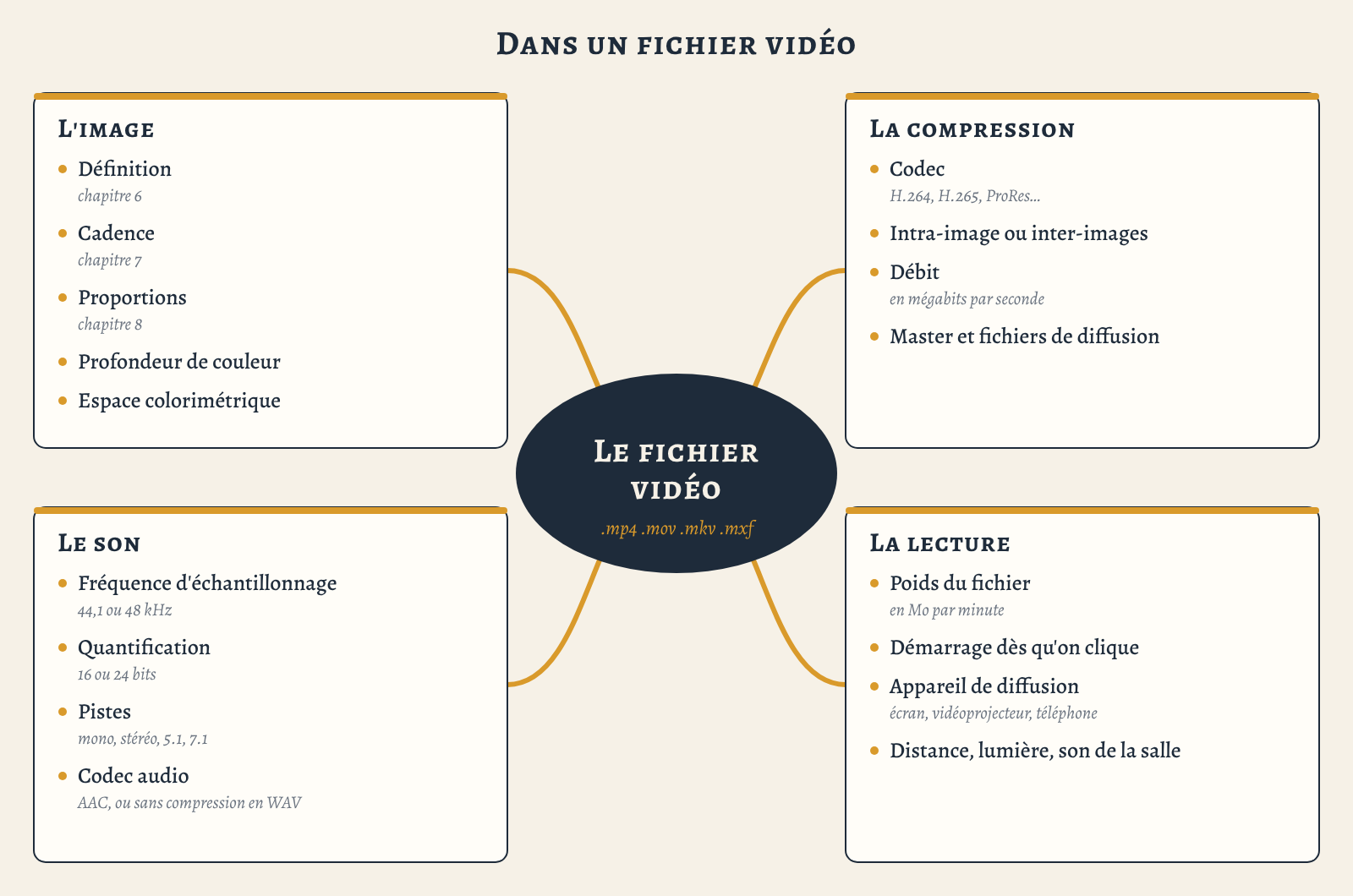
This chapter, in fact, gathers what we have seen in the previous chapters around a very concrete object that we handle all the time: the video file. We do not touch it, but almost. When I film with my phone, what I get is a video file, and when I edit, I put files together in order to export another one, which will be read by a video projector, by a website, by a screen in an exhibition, and now also by artificial intelligences, which receive and export them too. It really is our reality, in other words everyone handles them, every day, and that is why, in the professional training courses I run, I often start from the video file to approach all the technical basics of video. I will remain general here, because the detail of each of the things I talk about is dealt with in other articles, the ones before this, and others that will come after.
The box and its contents
First we need to distinguish the container from the codec, and this is important. The container is what the file extension designates, .mp4, .mov, .mkv, .avi, in other words a box, in which we put a picture track, a sound track, sometimes subtitles. In my training courses, I say that .mov is Steve, because it comes from QuickTime, at Apple, and that .avi is Bill, because it comes from Windows. The codec is the way the picture and the sound have been compressed inside this box, which the computer must know in order to decompress them, hence its name, coder-decoder. The two are very often confused, because export menus present them together.
This explains a lot of things. An .mp4, for example, can contain H.264, which plays almost everywhere, or H.265, which some computers cannot read. iPhones have filmed in H.265 since 2017, with the setting called “High Efficiency”, and if you choose “Most Compatible”, you go back to H.264. So when someone tells me that a video “doesn’t work” on a computer, very often it is the codec that is not recognised, not the box. Conversely, a .mov can contain ProRes, which is very heavy, or H.264, which is much lighter.

Why we compress
So why do we compress? We need to do a little calculation. A Full HD image is a little over two million pixels, and for each pixel there are three numbers, for red, green and blue, so roughly 6 MB per image, and since there are 25 of them per second, that makes 155 MB per second, and more than 9 GB for one minute of film.
And we must understand that this cannot go through internet connections. 155 MB per second is about 1,200 megabits per second, whereas a 4G connection, in practice, gives a few dozen megabits per second, and fibre often a few hundred, shared with the whole household. A 128 GB phone, by the way, would be full after a quarter of an hour. So we have to compress, and not just a little, since to put a film online I advise staying around 20 MB per minute, more than four hundred times less.
In the 2000s, I made a lot of DVDs, for Agnès Varda, who was then publishing her own films, for the reissues of Jacques Tati’s films, and for the experimental film publisher Re:Voir. On a DVD, the definition was fixed, the bitrate had a limit, and all the work on image quality went through encoding. There is a whole history, from JPEG to MPEG-4, each new codec making files lighter but requiring more computing power. I will tell it in another article.

Codecs do not all compress in the same way. MJPEG, for example, is a video codec in which each image is a JPEG image, isolated from the others: it is called intra-frame. Apple’s ProRes works the same way, and its files are huge, but the image stays impeccable.
The MPEG family works differently, and it is rather clever. From one image to the next, most of the time, almost nothing changes, so the codec does not rewrite everything: it notes what has moved, and takes the rest from the previous image. MPEG-2, from 1997 onwards, was the DVD. For the internet, MPEG-4 is the most widely used today, with H.264, and now H.265, also called HEVC, which is even more efficient. The downside is that there can be pixelation on movement: a tree in the wind, a crowd, a fast pan, and the image starts to break into big squares, as I described about the DVD in Chapter 6 : Image definition.

The right codec depends on the moment. My phone films in H.264 or H.265, to save its memory. At the end of the edit, I export a master of the best possible quality, often in ProRes. To distribute, I encode files in H.264, in an .mp4 that everyone can play. This is the distinction I make in Create lightweight, high-quality video files between the master file, which is carefully kept in two copies, and the distribution files, each encoded for one use.
Bitrate, which nobody looks at
For a compressed file, what matters most for quality is the bitrate: how much information the codec allows itself for each second of film. It is measured in megabits per second, and almost nobody looks at it. Yet two files of the same definition, with different bitrates, do not give the same image at all. A 4K video with a low bitrate can be less beautiful than a well-encoded Full HD video, because the codec did not have enough room to describe all its pixels.
Handbrake, the free software I use to encode my distribution files, does not ask for a bitrate. You give it a quality level, and it calculates by itself the bitrate each shot needs. The lower the number, the better the quality. At 18, it is excellent, but the files are really heavy. At 20, it is very good. At 22, it is quite correct, and the files are lighter. At 25, they are very light, but fast movements become pixelated. If you want to understand what a codec does, I know of nothing better: encode the same shot at 18, then at 25, and look.
Bitrate also affects playback over the internet. If the bitrate is reasonable and the file’s index is placed at the beginning, the video starts playing while it is still downloading. In Handbrake, you just tick a box called “Web Optimized”. The film then starts as soon as you click, without going through a platform, as I explain in Best practices for putting videos online.
How many shades
In the file, each pixel has a value, and this value has a certain number of possible shades: this is colour depth. Let us first take a black-and-white image. In ordinary video, as in a JPEG photograph, it is coded in 8 bits, which means there are only 256 shades of grey between black and white. Our eye can distinguish many more. You can see it very clearly in a slow fade: instead of darkening smoothly, the image moves from one shade to the next in small jumps, it stutters, simply because there are not enough shades. For a colour image, it is the same for each of the three primary colours, red, green and blue: 256 shades each, which makes about 16 million colours, a figure that seems enormous and yet is not always enough.
In digital cinema, each colour is coded in 12 bits, that is 4,096 shades between black and white, and that changes a lot. Imagine a shot with, in the same image, very dark areas, an undergrowth for example, and a very bright sky. In 12 bits, you can have detail everywhere, in the shadows, in the midtones and in the sky. In 8 bits, you have to choose. If you keep detail in the shadows, the sky will be completely white, and if you keep detail in the sky, what is in the shadow will be completely black. So colour depth is not only a matter of accurate colours, it is the very nuance of the image. After the number of pixels, there is the nuance of each pixel.

I think of painting. Depending on the pigments and the way they are applied, a painting can have incredible nuances, as in the sfumato of the Italian painters, those transitions from light to shadow so soft that you cannot see where they end. In 8 bits, a video image is made rather of flat areas, with nuances within those areas, of course; in 12 bits, it can move towards much finer nuances. Yet one can make magnificent images with few shades, flat areas, simple shapes, strong contrasts: these are aesthetic choices. In between, 10 bits, with 1,024 shades per primary colour, is offered by many recent phones and cameras. The history of colour depth will also be the subject of another article.
The colour space, for its part, describes the range of colours the file can represent: how far the most saturated red goes, the most vivid green. HD video uses a standard called Rec. 709, digital cinema a wider space, and HDR video a wider one still. Many phones now film in HDR, and it is a trap. If these images are shown on a screen, a projector or with software that does not handle HDR, they look dull, washed out. Nothing is wrong with the file; the colours are being read in the wrong space. When you do not yet know where the film will be shown, it is better to turn off the phone’s HDR.
Sound in the file
We often forget it, but a video file also contains sound, and it too has its own characteristics. I described the nature of sound in Chapter 5 : Sound techniques. The microphone turns the vibration of the air into a varying electric current, and, to record it digitally, this curve has to be turned into a series of numbers.
To do this, time is first cut into very thin slices. How many slices per second? That is the sampling rate. The audio CD takes 44,100 of them, we say 44.1 kHz. In video, we almost always work at 48 kHz, and some studios go up to 96 or even 192 kHz. Then each slice is measured, and the whole question is how finely: 256 possible values, or 16 million? This is called quantisation. The audio CD is in 16 bits, about 65,000 values for each slice, and today we often record in 24 bits, more than 16 million, which leaves an enormous margin between a whisper and a shout.
Then there is the number of tracks, as many as there are speakers: one in mono, two in stereo. In cinema, we work in 5.1: a speaker in the centre, behind the screen, for voices, two speakers to the left and right of the screen for music and sound effects, speakers on the sides and at the back for ambience, and a subwoofer for the bass. 7.1 separates the sides from the back. Like the image, the sound is compressed in the file, most often in AAC in an .mp4, whereas a .wav or .aiff file keeps it uncompressed.

Much more than pixels
When we talk about the quality of a video, we first think of the number of pixels, because it is the figure that devices put forward. But for the person watching, quality is the whole file, and the way it is played. Pixels matter, of course, but everything depends on the distance between the eye and the screen, as I explained in Chapter 6 : Image definition. I also think of all those films whose movements stutter because the frame rate changed between shooting and export, which I showed in Chapter 7 : Frame rate, or of those archive images stretched in museums, with widened faces, which I discuss in Chapter 8: Image proportions. Too low a bitrate, and the image breaks into squares as soon as anything moves. Not enough shades, and the sky is white. And if the film is slow to start, or stops in the middle, nobody watches it to the end.
The venue matters too. A very fine video on a badly placed screen, in an overly lit room, will give a poorer experience than a more modest video that is well installed.
Opening the file
To find out what is in a file, you can open it with MediaInfo, a free program that displays everything I have talked about here, or with the VLC player, in the Tools menu, under “Codec Information”. I suggest trying it with three files: a rush from your phone, an export from your editing software, and a video downloaded from the internet. You immediately see why one weighs ten times more than another, or why one of them will not play.
I know that all this sounds like jargon, and I sometimes forget it, because these things have been familiar to me for a very long time. But in fact it is not reserved for specialists: it takes an hour to understand, and a few minutes to check in an export menu. It is the same bet I made for the web, in Why understand how the web works: when you understand what you are handling, you can choose for yourself. So before installing a video in an exhibition, I check the codec, the definition in relation to the audience’s distance, the frame rate, the proportions in relation to the screen, and the weight of the file, because both the smoothness of playback and the possibility of keeping it depend on it.


